The kit for a wedding
At a wedding I work with several sources at once, and each one has its job:
- Locked-off camera at the altar: a wide shot on a tripod that records the whole ceremony without stopping. It's the safety net.
- Handheld camera: the one I move. Details, the couple, guests, reactions.
- Drone: the arrival, the venue, the outdoors.
- GoPro or phone: the dance floor, unusual angles, details.
- Guests' videos: party moments, laughs, dances nobody else caught.
For sound, a lavalier mic for the vows and speeches, and the cameras' own audio for ambience.
Before shooting: two minutes that save hours
- Set every camera's clock to the same reference. It's what lets the day build itself later. More in why your camera's clock ruins your edit.
- Format the cards and check the batteries, including the clock battery on cameras that haven't been used for a while.
Offloading
When you're done, copy each card into its own folder inside the wedding folder, without renaming anything. Guests' videos go in another folder. Ask them to send them in the best quality they can: WhatsApp has an HD sending option (WhatsApp help).
Building the day: each camera on its own track
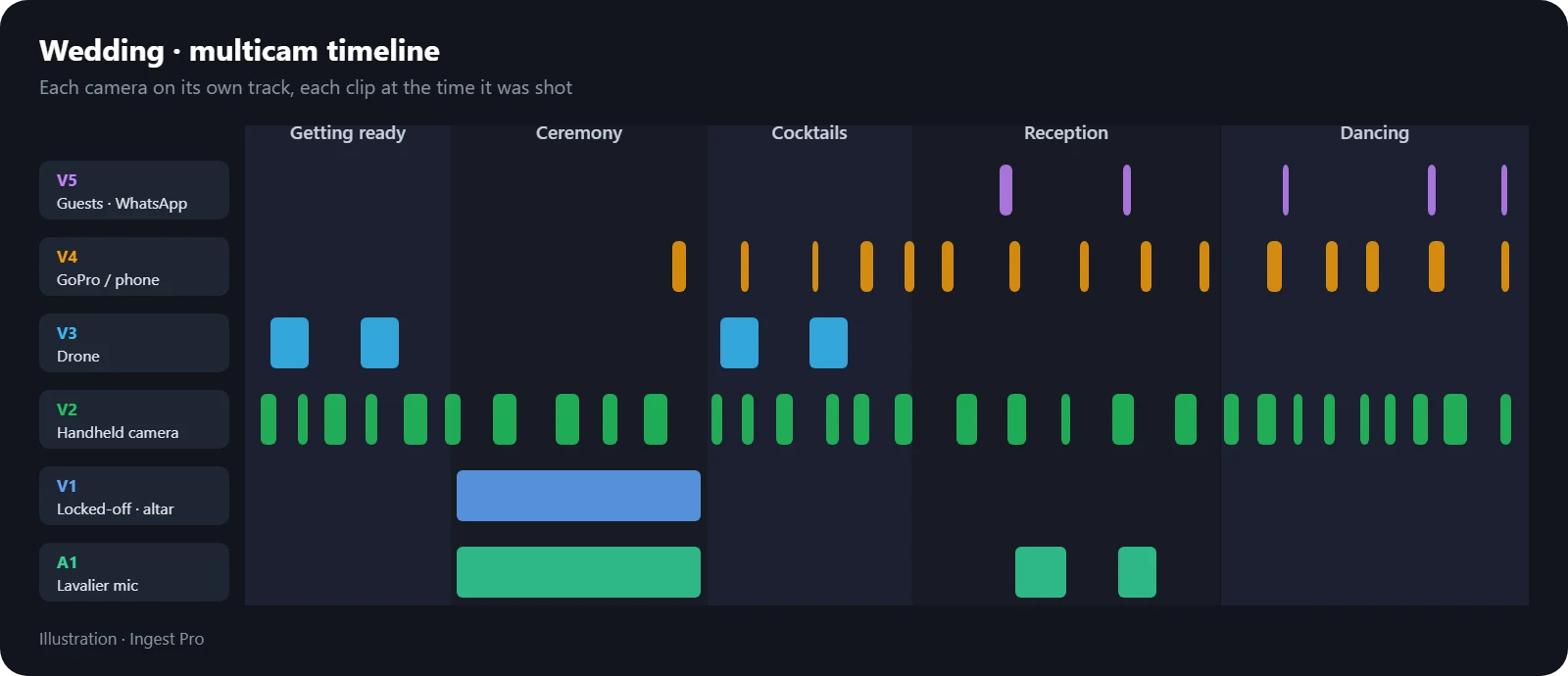
This is where the hours go if you do it by hand. With Ingest Pro I give it the folder and it places every clip at the time it was shot, each camera on its own track, and fine-tunes the rest by audio. The desktop app also recognises WhatsApp videos and gives them their own track, and duplicates (the same video sent by two guests) can be kept on top or removed.
The result is the whole wedding in order, from getting ready to the dancing, before cutting a single shot.
Audio
- For the ceremony and speeches, the base is the lavalier: it's the one you can understand.
- The cameras' audio is for ambience (applause, music, people) and for syncing.
- The drone rarely brings useful sound: its shots go with the music or another camera's ambience.
Two deliverables: trailer and full film
Both come out of the same timeline:
- The full film: the whole ceremony with the locked-off camera as the base, cutting to the handheld at key moments, and the rest of the day summarised.
- The trailer: the best of the day in a few minutes, cut to music, with the drone to open and the guests' videos for the party.
Start with the full film: while reviewing it you're already marking the shots for the trailer.
Three wedding tips
- The locked-off camera never stops during the ceremony. If something fails handheld, there's always a shot.
- Guests' videos are gold for the trailer: moments nobody on the crew saw.
- Don't cut until the day is in order. With everything at its time, editing is choosing; without it, it's searching.